
Tuner
Click Tuner in the header to tune without leaving your rig. The tuner replaces the lower module editor while the grid stays visible.
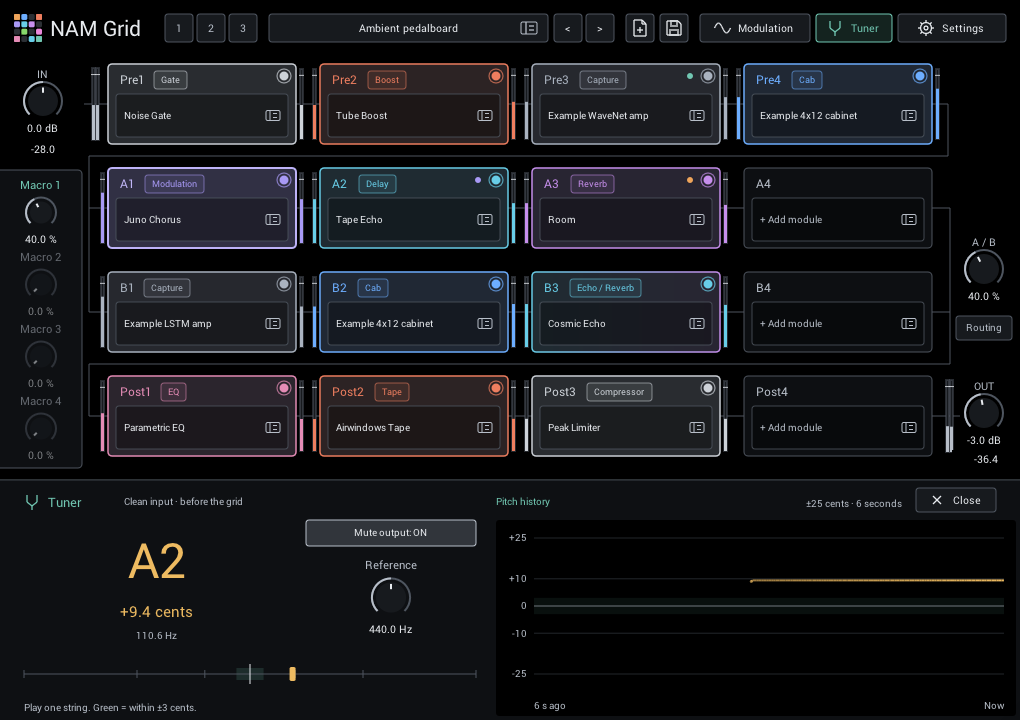
- Mute output is on by default. Turn it off to hear the processed rig while tuning.
- Tune toward 0 cents. The center band marks ±3 cents.
- Reference sets concert pitch from 430 to 450 Hz; 440 Hz is the usual starting point.
- The six-second history helps you see whether a note drifts sharp or flat after the attack. It fades with age and breaks at silence or a new note.
Click Tuner again, select a module, close the tuner, or press Escape to return. Output is restored smoothly.
The tuner listens to the clean input before the grid, including a right-only input. Tuner on/off and mute can be automated by your DAW and continue to work with the plugin window closed. DAW projects retain tuner settings; rig presets and performance scenes leave them unchanged, so loading a sound cannot unexpectedly mute you.