
Modulation
Chorus, flanger, phaser, tremolo, rotary and ring modulation.
| Module | In short |
|---|---|
| Chorus | Dry plus moving delay; Depth adds detune, Spread separates voices. |
| Juno Chorus | Mode chooses one or both moving voices; Brightness softens their wet tone. |
| Flanger | Swept comb notches; Feedback sharpens them. |
| Phaser | Six swept phase stages; Feedback deepens the resonant swirl. |
| Auto Tremolo | Rate sets pulses, Depth sets dips; Pulse / feel adds sharper motion. |
| Vibrato | Fully wet pitch motion; Rate and Depth set speed and excursion. |
| Rotary | Fast switches the rotation speed; Ramp time sets the transition. |
| Uni-Vibe | Uneven phase sweep; Vibrato mode removes the dry blend. |
| Ring Modulator | Frequency and Depth create metallic sidebands; Mix restores dry tone. |
Chorus
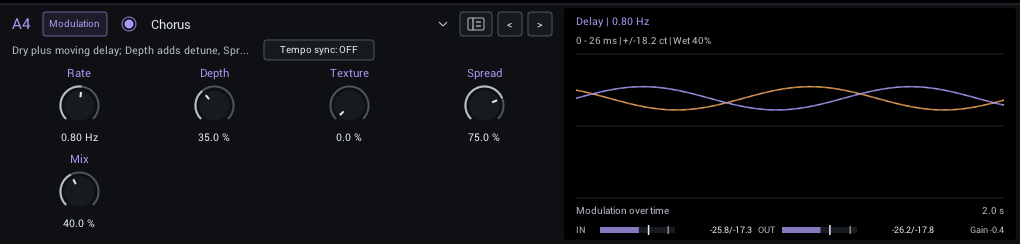
A wide, moving chorus. Texture adds warmth and less regular motion; Spread separates the left and right voices.
| Control | Range | Start | What it does |
|---|---|---|---|
| Rate | 0.05–10 Hz | 0.8 Hz | Speed of the modulation cycle. |
| Depth | 0–100% | 35% | Width of the pitch, delay or filter sweep. |
| Texture | 0–100% | 0% | Warmer tone and more uneven pitch movement; zero keeps a smooth sine sweep. |
| Spread | 0–100% | 75% | Phase offset between left and right chorus voices; zero is centered, 100 is opposite motion. |
| Mix | 0–100% | 40% | Balance between dry sound and effect. |
In the header:
- Tempo sync locks Rate to your DAW tempo; Division then sets it in note values. See tempo sync.
Display: The left and right delay times over two seconds.
Juno Chorus
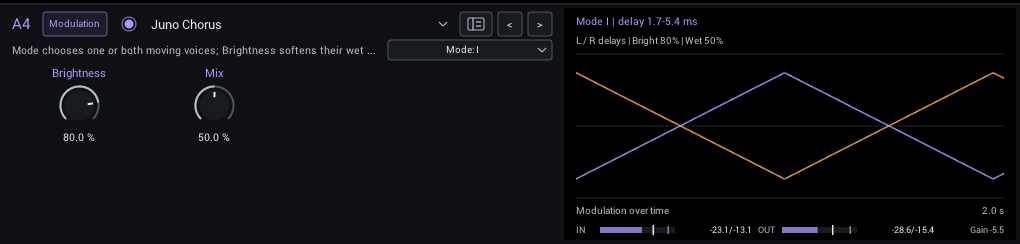
Classic Juno-style chorus with I, I+II and II modes, from a subtle single voice to the familiar combined shimmer.
| Control | Range | Start | What it does |
|---|---|---|---|
| Brightness | 0–100% | 80% | Treble retained in the wet voices; lower values soften the chorus. |
| Mix | 0–100% | 50% | Balance between dry sound and effect. |
In the header:
- Mode (I, I+II, II; starts at I) I is the slower voice, II the faster voice, I+II combines both.
Display: The left and right delay times over two seconds.
Flanger
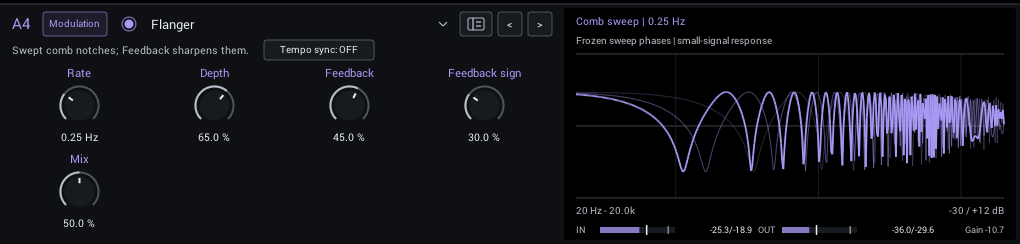
A sweeping jet-like flanger. Feedback adds intensity; Feedback sign changes its character and darkness.
| Control | Range | Start | What it does |
|---|---|---|---|
| Rate | 0.05–10 Hz | 0.25 Hz | Speed of the modulation cycle. |
| Depth | 0–100% | 65% | Width of the pitch, delay or filter sweep. |
| Feedback | 0–75% | 45% | Return the swept signal into itself for a more resonant, pronounced effect. |
| Feedback sign | 0–100% | 30% | Moves feedback from positive through zero to negative. Turning it toward negative also darkens the wet path (12k to 3k) and changes the sweep shape. |
| Mix | 0–100% | 50% | Balance between dry sound and effect. |
In the header:
- Tempo sync locks Rate to your DAW tempo; Division then sets it in note values. See tempo sync.
Display: The comb response at several points of the sweep.
Phaser
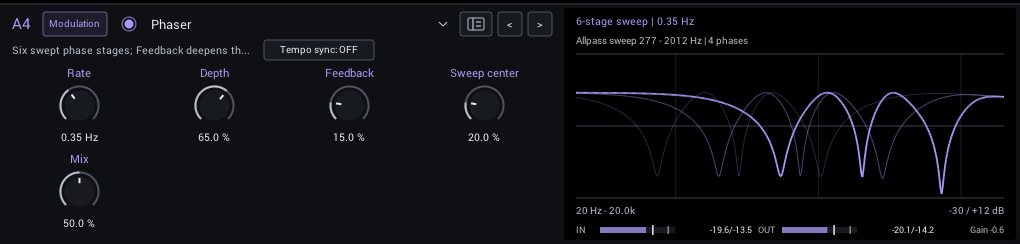
A smooth, swirling phase effect. Sweep center moves the sweep into a different part of the guitar's tone.
| Control | Range | Start | What it does |
|---|---|---|---|
| Rate | 0.05–10 Hz | 0.35 Hz | Speed of the modulation cycle. |
| Depth | 0–100% | 65% | Width of the pitch, delay or filter sweep. |
| Feedback | 0–75% | 15% | Return the swept signal into itself for a more resonant, pronounced effect. |
| Sweep center | 0–100% | 20% | Raises the center of the six-stage phase sweep. |
| Mix | 0–100% | 50% | Balance between dry sound and effect. |
In the header:
- Tempo sync locks Rate to your DAW tempo; Division then sets it in note values. See tempo sync.
Display: The phaser response at several points of the sweep.
Auto Tremolo
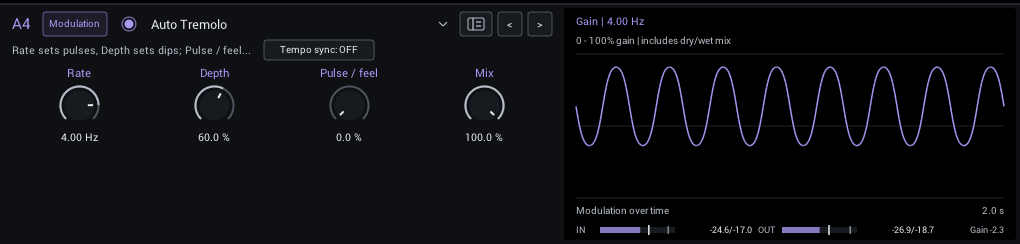
Rounded volume pulses. Pulse / feel sharpens them and, without tempo sync, speeds them up as you play harder.
| Control | Range | Start | What it does |
|---|---|---|---|
| Rate | 0.05–10 Hz | 4 Hz | Speed of the modulation cycle. |
| Depth | 0–100% | 60% | How far the volume dips on each pulse. |
| Pulse / feel | 0–100% | 0% | Sharpens pulses; stronger playing also speeds them up when tempo sync is off. |
| Mix | 0–100% | 100% | Balance between dry sound and effect. |
In the header:
- Tempo sync locks Rate to your DAW tempo; Division then sets it in note values. See tempo sync.
Display: The gain over two seconds, including the dry blend.
Vibrato
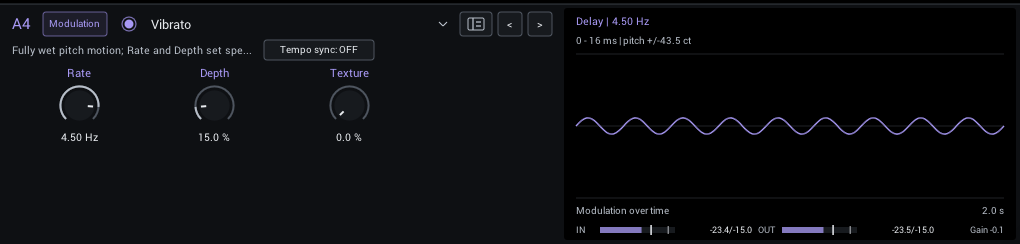
Fully wet pitch modulation; Texture adds drift and darkening.
| Control | Range | Start | What it does |
|---|---|---|---|
| Rate | 0.05–10 Hz | 4.5 Hz | Speed of the modulation cycle. |
| Depth | 0–100% | 15% | Width of the pitch, delay or filter sweep. |
| Texture | 0–100% | 0% | Warmer tone and more uneven pitch movement; zero keeps a smooth sine sweep. |
In the header:
- Tempo sync locks Rate to your DAW tempo; Division then sets it in note values. See tempo sync.
Display: The delay sweep and its pitch excursion in cents.
Rotary
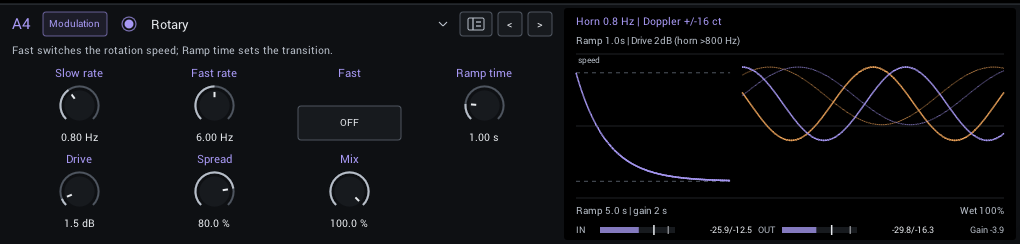
A rotating-speaker simulation with separate slow and fast rates, a ramp between them, drive and stereo spread.
| Control | Range | Start | What it does |
|---|---|---|---|
| Slow rate | 0.1–2 Hz | 0.8 Hz | Target rotation speed; the drum turns at 73 percent of the horn speed. |
| Fast rate | 2–10 Hz | 6 Hz | Target rotation speed; the drum turns at 73 percent of the horn speed. |
| Fast | Off / On | Off | Choose slow or fast target speed. Ramp time controls the transition. |
| Ramp time | 0.1–5 s | 1 s | Time constant for speed changes; larger values accelerate and slow down more gradually. |
| Drive | 0–18 dB | 1.5 dB | Soft saturation before the rotating-speaker modulation. |
| Spread | 0–100% | 80% | Stereo separation of horn/drum motion; zero centers the wet signal. |
| Mix | 0–100% | 100% | Balance between dry sound and effect. |
Display: The speed ramp and the horn and rotor motion.
Tips:
- Automate Fast to switch speeds; Ramp time sets how long the speaker takes to change.
Uni-Vibe
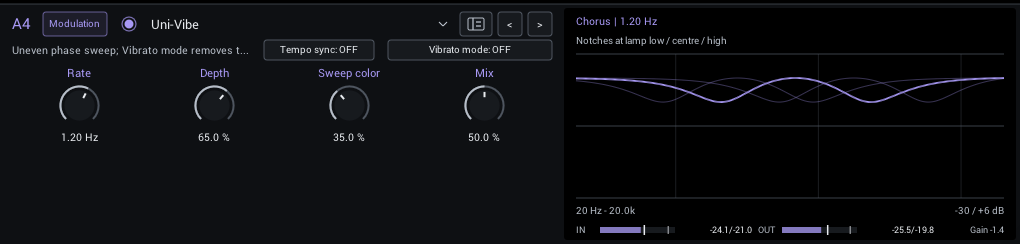
A pulsing, uneven photocell-vibe sweep. Vibrato mode removes the dry sound for pitch movement.
| Control | Range | Start | What it does |
|---|---|---|---|
| Rate | 0.05–10 Hz | 1.2 Hz | Speed of the modulation cycle. |
| Depth | 0–100% | 65% | Width of the pitch, delay or filter sweep. |
| Sweep color | 0–100% | 35% | Expands the uneven four-stage sweep for a deeper, more vocal swirl. |
| Mix | 0–100% | 50% | Balance between dry sound and effect. |
In the header:
- Tempo sync locks Rate to your DAW tempo; Division then sets it in note values. See tempo sync.
- Vibrato mode (off / on; starts off) Vibrato uses only the phase-shifted signal; chorus mode retains the selected dry/wet blend.
Display: The notches at three lamp positions.
Ring Modulator
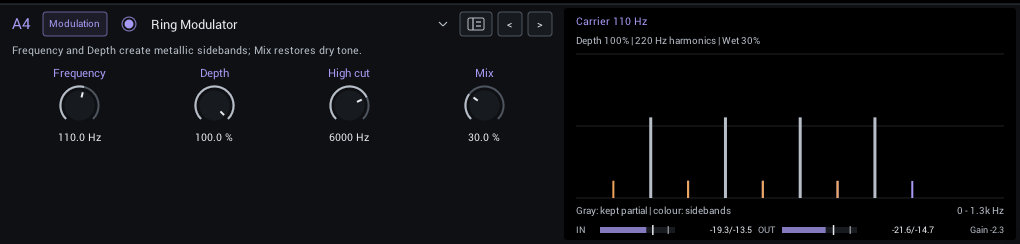
Multiplies the guitar with a sine carrier for metallic, inharmonic sidebands.
| Control | Range | Start | What it does |
|---|---|---|---|
| Frequency | 1–5000 Hz | 110 Hz | Carrier frequency; adds sum/difference sidebands and metallic, often inharmonic tones. |
| Depth | 0–100% | 100% | Move from the original amplitude toward full bipolar ring modulation. |
| High cut | 200–20000 Hz | 6000 Hz | High-cut frequency of the processed signal. Lower values tame brightness and harshness. |
| Mix | 0–100% | 30% | Balance between dry sound and effect. |
Display: The partials of a 110 Hz note and the sidebands the carrier creates.