
EQ / Filter
Tone shaping, filters and wah.
| Module | In short |
|---|---|
| Guitar EQ | Bass, Mid and Treble shape the tone; the curve shows the combined response. |
| Cut EQ | Low cut and High cut trim rumble and fizz; Presence adds bite. |
| Parametric EQ | Bell or notch, resonant cuts, and an optional low shelf. |
| Console EQ | Broad console bands with harmonic colour on louder notes. |
| Filter | Cutoff and Resonance shape tone; Envelope follows playing strength. |
| Wah | Position sweeps the peak; Register moves its heel and toe range. |
Guitar EQ
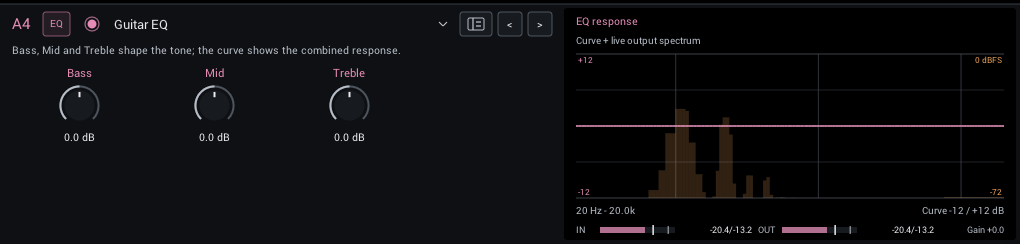
Three broad bands for everyday tone shaping: a 150 Hz shelf, a broad 800 Hz bell and a 3 kHz shelf.
| Control | Range | Start | What it does |
|---|---|---|---|
| Bass | -12 to +12 dB | 0 dB | 150 Hz shelf. |
| Mid | -12 to +12 dB | 0 dB | Broad 800 Hz bell. |
| Treble | -12 to +12 dB | 0 dB | 3 kHz shelf. |
Display: The combined EQ curve over the live output spectrum.
Cut EQ
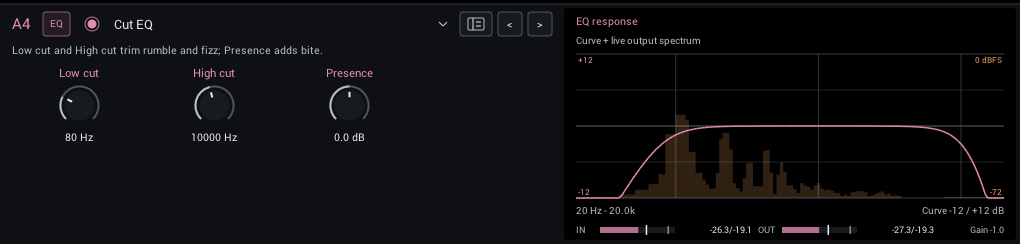
Low cut and high cut for rumble and fizz, plus a 3.5 kHz presence shelf.
| Control | Range | Start | What it does |
|---|---|---|---|
| Low cut | 0–300 Hz | 80 Hz | Removes rumble and boom below this frequency; 0 is off. |
| High cut | 2000–20000 Hz | 10000 Hz | Removes fizz above this frequency; 20000 is open. |
| Presence | -6 to +6 dB | 0 dB | 3.5 kHz shelf for bite or smoothness. |
Display: The combined EQ curve over the live output spectrum.
Tips:
- For bass, lower Low cut to 30 to 45 Hz or turn it off; 80 Hz is an electric-guitar choice.
Parametric EQ
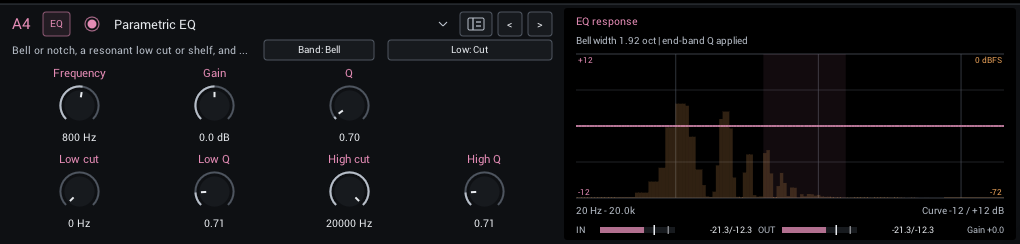
One bell or notch from 20 Hz to 20 kHz with ±12 dB and Q 0.1 to 20, plus independent resonant low and high cuts. Switch the low cut to a shelf for a low-frequency boost or reduction. Notch mode hides Gain because the notch depth is fixed.
The top row groups the bell/notch controls and optional Shelf gain. The bottom row pairs each end-band frequency with its Q: Low cut (or Low shelf), Low Q, High cut, High Q.
| Control | Range | Start | What it does |
|---|---|---|---|
| Frequency | 20–20000 Hz | 800 Hz | Center frequency of the bell or notch; Q sets how narrow the affected band is. |
| Gain | -12 to +12 dB | 0 dB | Boost or cut the selected band. Notch mode removes this control because notch depth is fixed. |
| Q | 0.1–20 | 0.7 | Higher Q narrows the bell or notch; lower Q changes a broader part of the guitar tone. |
| Shelf gain | -12 to +12 dB | 0 dB | Low-frequency boost or reduction; visible in Shelf mode. |
| Low cut / Low shelf | 0–300 Hz | 0 Hz | Low-band frequency; 0 bypasses the low band in either mode. |
| Low Q | 0.1–4 | 0.71 | Shapes the low cut or shelf transition; higher values add resonance. |
| High cut | 2000–20000 Hz | 20000 Hz | Removes highs above this frequency; 20000 is open. |
| High Q | 0.1–4 | 0.71 | Shapes the high-cut transition; higher values add resonance. |
In the header:
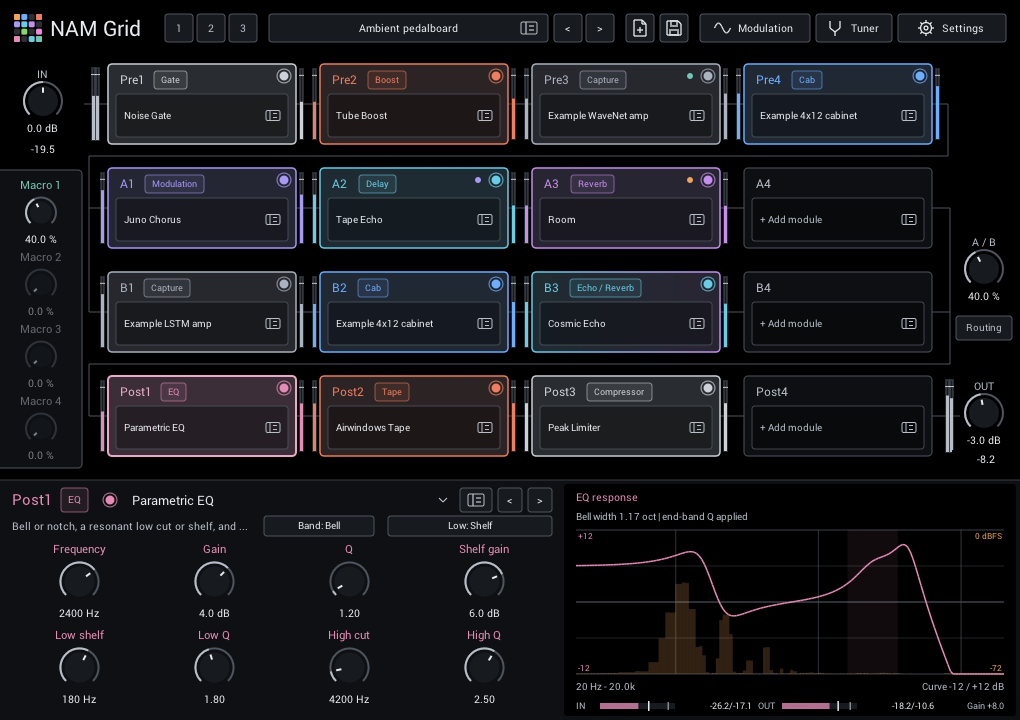
- Band: Bell / Notch (starts at Bell): Notch rejects a narrow band without a Gain control; Bell boosts or cuts using Gain.
- Low: Cut / Shelf (starts at Cut): Choose a resonant low cut or a low shelf with its own gain. Both use Low Q.
Display: The combined EQ curve includes both end-band frequencies, Q values and the shelf gain over the live output spectrum; the shaded band is the bell's width. The curve scale expands when boosts or resonant peaks need more room. Existing presets retain their original cut response at the default end-band Q values.
Tips:
- Find a harsh frequency with a narrow boost, then turn Gain negative.
Console EQ
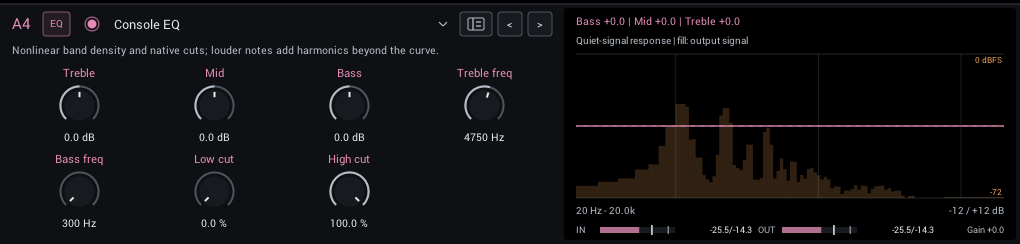
Airwindows-style console EQ with broad, overlapping bands and extra harmonic colour on louder notes. Its cuts use relative amounts rather than frequencies.
| Control | Range | Start | What it does |
|---|---|---|---|
| Treble | -6 to +6 dB | 0 dB | Boost or cut the band. It also adds harmonics, so the actual change depends on how hard you play. |
| Mid | -6 to +6 dB | 0 dB | Boost or cut the band. It also adds harmonics, so the actual change depends on how hard you play. |
| Bass | -6 to +6 dB | 0 dB | Boost or cut the band. It also adds harmonics, so the actual change depends on how hard you play. |
| Treble freq | 1000–16000 Hz | 4750 Hz | Moves the band. An approximate frequency; the broad bands overlap. |
| Bass freq | 300–16000 Hz | 300 Hz | Moves the band. An approximate frequency; the broad bands overlap. |
| Low cut | 0–100% | 0% | Removes low end; 0% is off. A relative amount, not a frequency. |
| High cut | 0–100% | 100% | Removes highs; 100% is open, lower is darker. A relative amount, not a frequency. |
Display: The quiet-signal response over the live output spectrum. Louder notes add harmonics the curve cannot show.
Filter
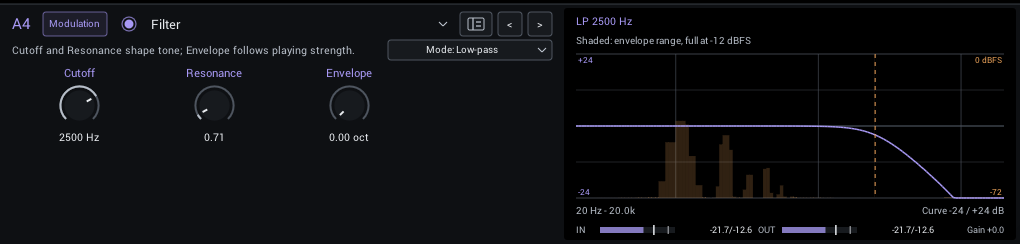
A resonant low-pass, high-pass or band-pass filter. Envelope opens the cutoff up to four octaves as you play harder.
| Control | Range | Start | What it does |
|---|---|---|---|
| Cutoff | 40–12000 Hz | 2500 Hz | Resting filter frequency. Envelope opens it upward; resonance emphasizes its edge. |
| Resonance | 0.5–4 | 0.71 | Emphasis around the cutoff. Higher values create a more vocal, peaky response. |
| Envelope | 0–4 oct | 0 oct | Maximum upward sweep in octaves as you play harder. Zero makes the filter static. |
In the header:
- Mode (Low-pass, High-pass, Band-pass; starts at Low-pass) Low-pass darkens, high-pass thins, band-pass isolates a vocal band.
Display: The filter response over the live output spectrum; the shaded range shows the envelope's reach at -12 dBFS.
Tips:
- Set Envelope to 2 octaves and Resonance to about 2 for an auto-wah.
Wah
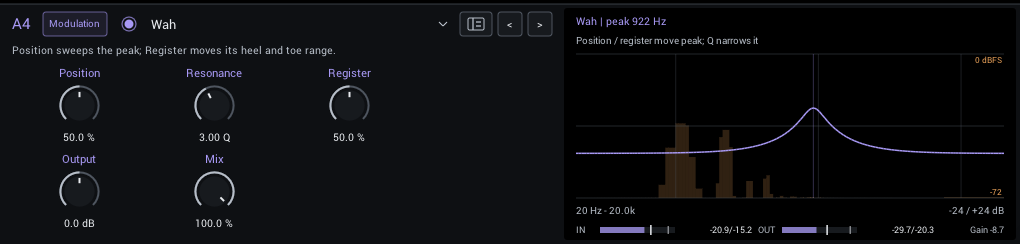
An automatable wah sweep: a resonant band-pass with body. Map Position to an expression pedal through your DAW.
| Control | Range | Start | What it does |
|---|---|---|---|
| Position | 0–100% | 50% | Heel-to-toe sweep. Automate it or map it to an expression controller in the host. |
| Resonance | 1–6 Q | 3 Q | Higher Q makes a narrower, more pronounced wah peak. |
| Register | 0–100% | 50% | Raises both heel and toe endpoints; it changes the register, not the sweep width. |
| Output | -12 to +12 dB | 0 dB | Final level. Match bypass volume when comparing tones. |
| Mix | 0–100% | 100% | Balance between dry sound and effect. |
Display: The wah peak over the live output spectrum.
Tips:
- Draw automation for Position, or map it to a MIDI controller in your DAW.