
Reverb
Rooms, plates, halls, springs, shimmer and ambient echoes.
| Module | In short |
|---|---|
| Room | Short reflections for intimacy; Size changes spacing, Decay the tail. |
| Dense Plate | Dense, smooth tail; Pre-delay keeps the dry attack distinct. |
| Cloud | Long moving wash; Damping and Low cut keep the tail clear. |
| Hall | Wide reflection spacing and a long tail; Pre-delay adds separation. |
| Spring Reverb | Dwell excites the spring; Drip adds splash, Damping tames treble. |
| Shimmer | Pitch and Amount build rising/falling tails; Freeze sustains them. |
| Airwindows Plate | Airwindows kPlate140: dense plate character; Sustain sets the length. |
| Airwindows Guitar Hall | Airwindows kGuitarHall2: colored hall with selectable early-reflection positions. |
| Galactic Space | Airwindows Galactic3: huge stereo space; Replace controls how new notes enter the wash. |
| Cosmic Echo | Valhalla Supermassive-inspired; Warp spreads echoes into a wash, Density then thickens it. |
Room
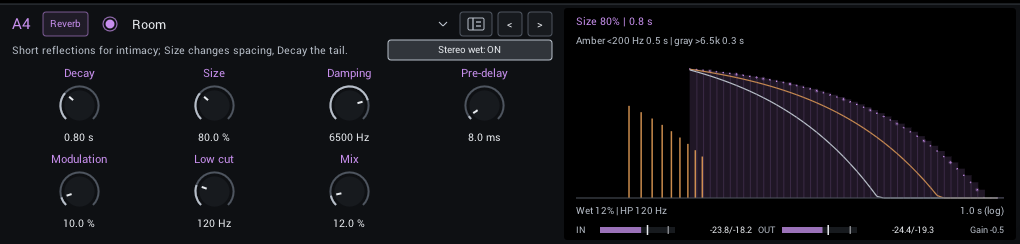
A close, supportive room that adds depth without pushing the guitar far back.
| Control | Range | Start | What it does |
|---|---|---|---|
| Decay | 0.15–30 s | 0.8 s | Tail decay time. Higher values let notes overlap into a larger ambient wash. |
| Size | 25–200% | 80% | Tank scale and reflection spacing. Larger settings sound more open; Decay controls how long they last. |
| Damping | 800–12000 Hz | 6500 Hz | Treble damping in the reverb. Lower settings make the tail darker than the dry signal. |
| Pre-delay | 0–200 ms | 8 ms | Gap before the reverb starts; separates the pick attack from the tail. |
| Modulation | 0–100% | 10% | Movement of the reverb delay lines; adds a gently shifting tail. |
| Low cut | 0–500 Hz | 120 Hz | Remove bass from the reverb send to keep the tail from getting boomy. |
| Mix | 0–100% | 12% | Balance between dry sound and effect. |
In the header:
- Stereo wet (off / on; starts on) Stereo wet spread; off folds the reverb to center while preserving dry stereo.
Display: Pre-delay, early reflections and the decay to -60 dB on a logarithmic time axis, with the low (amber) and high (gray) bands' decay.
Tips:
- Raise Pre-delay to keep the pick attack in front of the tail.
Dense Plate
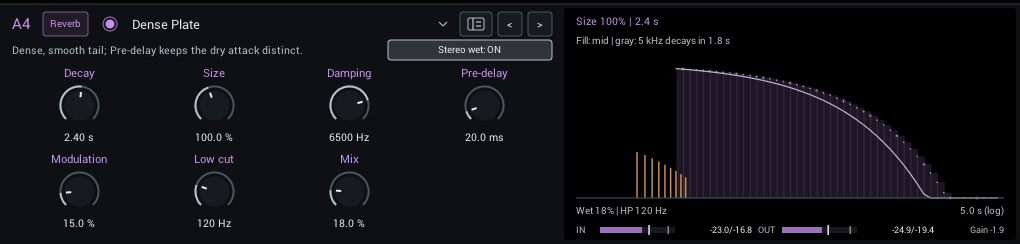
A smooth, dense plate that sits easily behind picked notes and chords.
| Control | Range | Start | What it does |
|---|---|---|---|
| Decay | 0.15–30 s | 2.4 s | Tail decay time. Higher values let notes overlap into a larger ambient wash. |
| Size | 25–200% | 100% | Tank scale and reflection spacing. Larger settings sound more open; Decay controls how long they last. |
| Damping | 800–12000 Hz | 6500 Hz | Treble damping in the reverb. Lower settings make the tail darker than the dry signal. |
| Pre-delay | 0–200 ms | 20 ms | Gap before the reverb starts; separates the pick attack from the tail. |
| Modulation | 0–100% | 15% | Movement of the reverb delay lines; adds a gently shifting tail. |
| Low cut | 0–500 Hz | 120 Hz | Remove bass from the reverb send to keep the tail from getting boomy. |
| Mix | 0–100% | 18% | Balance between dry sound and effect. |
In the header:
- Stereo wet (off / on; starts on) Stereo wet spread; off folds the reverb to center while preserving dry stereo.
Display: Pre-delay, early reflections and the decay to -60 dB on a logarithmic time axis, with the low (amber) and high (gray) bands' decay.
Tips:
- Raise Pre-delay to keep the pick attack in front of the tail.
Cloud
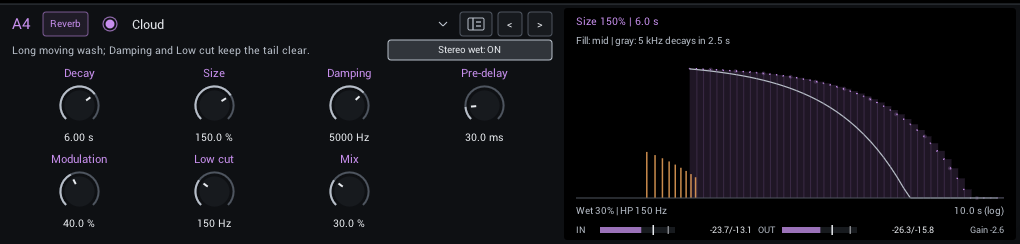
A long, slowly moving stereo wash for pads and ambient playing.
| Control | Range | Start | What it does |
|---|---|---|---|
| Decay | 0.15–30 s | 6 s | Tail decay time. Higher values let notes overlap into a larger ambient wash. |
| Size | 25–200% | 150% | Tank scale and reflection spacing. Larger settings sound more open; Decay controls how long they last. |
| Damping | 800–12000 Hz | 5000 Hz | Treble damping in the reverb. Lower settings make the tail darker than the dry signal. |
| Pre-delay | 0–200 ms | 30 ms | Gap before the reverb starts; separates the pick attack from the tail. |
| Modulation | 0–100% | 40% | Movement of the reverb delay lines; adds a gently shifting tail. |
| Low cut | 0–500 Hz | 150 Hz | Remove bass from the reverb send to keep the tail from getting boomy. |
| Mix | 0–100% | 30% | Balance between dry sound and effect. |
In the header:
- Stereo wet (off / on; starts on) Stereo wet spread; off folds the reverb to center while preserving dry stereo.
Display: Pre-delay, early reflections and the decay to -60 dB on a logarithmic time axis, with the low (amber) and high (gray) bands' decay.
Tips:
- Raise Pre-delay to keep the pick attack in front of the tail.
Hall
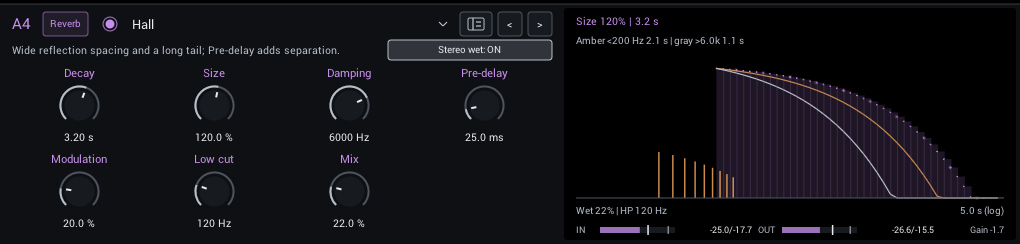
A wide, spacious hall with a long tail and separate bass and treble damping.
| Control | Range | Start | What it does |
|---|---|---|---|
| Decay | 0.15–30 s | 3.2 s | Tail decay time. Higher values let notes overlap into a larger ambient wash. |
| Size | 25–200% | 120% | Tank scale and reflection spacing. Larger settings sound more open; Decay controls how long they last. |
| Damping | 800–12000 Hz | 6000 Hz | Treble damping in the reverb. Lower settings make the tail darker than the dry signal. |
| Pre-delay | 0–200 ms | 25 ms | Gap before the reverb starts; separates the pick attack from the tail. |
| Modulation | 0–100% | 20% | Movement of the reverb delay lines; adds a gently shifting tail. |
| Low cut | 0–500 Hz | 120 Hz | Remove bass from the reverb send to keep the tail from getting boomy. |
| Mix | 0–100% | 22% | Balance between dry sound and effect. |
In the header:
- Stereo wet (off / on; starts on) Stereo wet spread; off folds the reverb to center while preserving dry stereo.
Display: Pre-delay, early reflections and the decay to -60 dB on a logarithmic time axis, with the low (amber) and high (gray) bands' decay.
Tips:
- Raise Pre-delay to keep the pick attack in front of the tail.
Spring Reverb
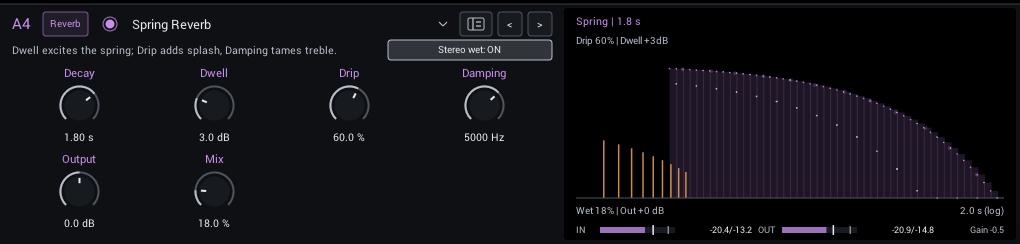
Splashy, spring-like repeats with extra edge when you push Dwell.
| Control | Range | Start | What it does |
|---|---|---|---|
| Decay | 0.3–4 s | 1.8 s | Tail decay time. Higher values let notes overlap into a larger ambient wash. |
| Dwell | 0–12 dB | 3 dB | Drive the spring send harder for more excitation and soft saturation. |
| Drip | 0–100% | 60% | Amount of spring dispersion: adds the splashy, metallic drip to attacks. |
| Damping | 800–12000 Hz | 5000 Hz | Treble damping in the reverb. Lower settings make the tail darker than the dry signal. |
| Output | -12 to +12 dB | 0 dB | Final level. Match bypass volume when comparing tones. |
| Mix | 0–100% | 18% | Balance between dry sound and effect. |
In the header:
- Stereo wet (off / on; starts on) Stereo wet spread; off folds the reverb to center while preserving dry stereo.
Display: The spring decay; Drip and Dwell shape the reflections.
Shimmer
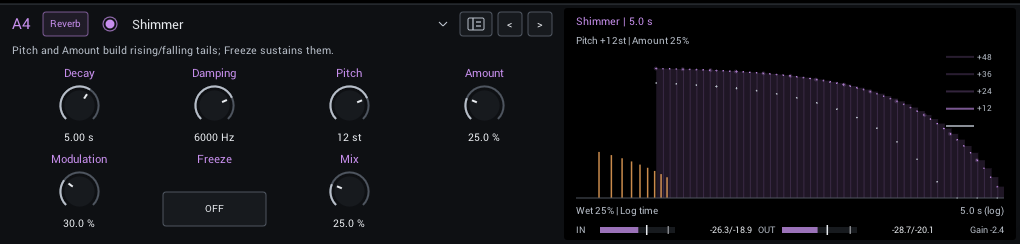
A reverb whose tail climbs or falls in pitch with each pass. Freeze holds the tail and stops new input.
| Control | Range | Start | What it does |
|---|---|---|---|
| Decay | 0.5–20 s | 5 s | Tail decay time. Higher values let notes overlap into a larger ambient wash. |
| Damping | 800–12000 Hz | 6000 Hz | Treble damping in the reverb. Lower settings make the tail darker than the dry signal. |
| Pitch | -24 to +24 st | 12 st | Semitone interval on each pitched reverb pass. Positive climbs, negative falls. |
| Amount | 0–100% | 25% | Pitched feedback into the reverb; more creates a stronger, longer shimmer. |
| Modulation | 0–100% | 30% | Movement of the reverb delay lines; adds a gently shifting tail. |
| Freeze | Off / On | Off | Sustain the tank and stop feeding new notes; release to return to the normal decay. |
| Mix | 0–100% | 25% | Balance between dry sound and effect. |
Display: The decay with the pitch steps each pass adds.
Airwindows Plate
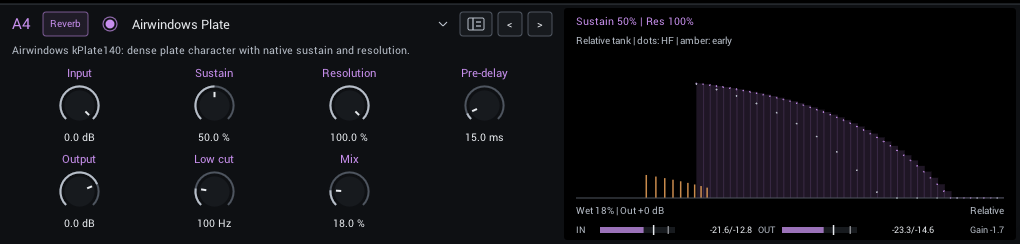
Airwindows kPlate140 plate ambience, with its original Sustain and Resolution character.
| Control | Range | Start | What it does |
|---|---|---|---|
| Input | -18 to 0 dB | 0 dB | Lowers the level into the plate, which reacts to how hard it is driven. 0 dB sends the original level. |
| Sustain | 0–100% | 50% | Tail length and blur. A relative amount, not a decay time. |
| Resolution | 25–100% | 100% | Lower settings make the space larger and darker. It changes in steps, which can be audible when automated. |
| Pre-delay | 0–200 ms | 15 ms | Gap before the plate send, in milliseconds. Separates the attack without changing the tank size. |
| Output | -18 to +6 dB | 0 dB | Final level. Match bypass volume when comparing tones. |
| Low cut | 0–500 Hz | 100 Hz | Remove bass from the plate send. Zero is off; higher values keep driven guitar from making the tank boomy. |
| Mix | 0–100% | 18% | Balance between dry sound and effect. |
Display: How full the reverb is over time.
Airwindows Guitar Hall
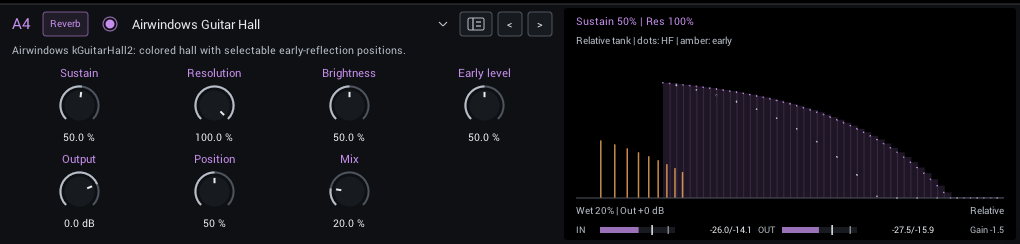
Airwindows kGuitarHall2 ambience, with selectable early-reflection positions for different room shapes.
| Control | Range | Start | What it does |
|---|---|---|---|
| Sustain | 0–95% | 50% | Hall length. A relative amount, not a decay time. |
| Resolution | 25–100% | 100% | Lower settings make the space larger and darker. It changes in steps, which can be audible when automated. |
| Brightness | 0–100% | 50% | Brightness of the hall. Lower is darker and softer, higher keeps more pick detail. |
| Early level | 0–100% | 50% | Level of the hall's early reflections; adds a closer, more defined room around the long tail. |
| Output | -18 to +6 dB | 0 dB | Final level. Match bypass volume when comparing tones. |
| Position | 0–100% | 50% | Chooses a different early-reflection pattern. It changes in steps, so moving it can be audible. |
| Mix | 0–100% | 20% | Balance between dry sound and effect. |
Display: How full the reverb is over time, with the early reflections.
Galactic Space
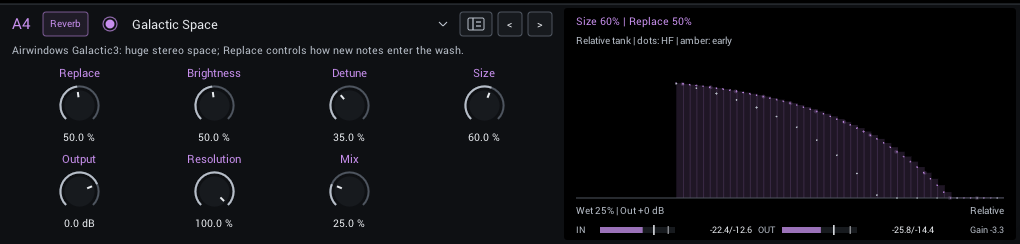
Airwindows Galactic3's huge, slowly evolving stereo space. Replace sets how quickly new notes enter the wash.
| Control | Range | Start | What it does |
|---|---|---|---|
| Replace | 5–100% | 50% | How quickly new notes replace the existing space. Lower settings keep a longer wash. |
| Brightness | 5–100% | 50% | Treble entering and leaving the space. Lower settings make a darker ambient bed. |
| Detune | 0–100% | 35% | Stereo pitch motion within the space; higher values make a wider, more obviously moving wash. |
| Size | 5–100% | 60% | Size of the space, together with Resolution. Changing it while the tail sounds can cause pitch and noise artifacts. |
| Output | -18 to +6 dB | 0 dB | Final level. Match bypass volume when comparing tones. |
| Resolution | 25–100% | 100% | Lower settings make the space larger and darker. It changes in steps, which can be audible when automated. |
| Mix | 0–100% | 25% | Balance between dry sound and effect. |
Display: How full the reverb is over time.
Cosmic Echo
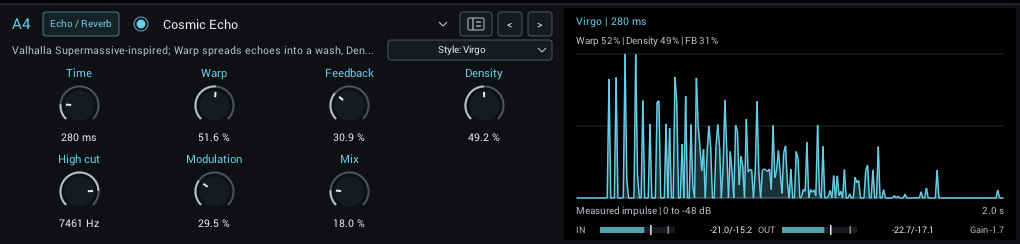
Six ambient echo and reverb styles from David Braun's MIT Faust reconstruction of the Valhalla Supermassive algorithms. See Cosmic Echo for the styles.
| Control | Range | Start | What it does |
|---|---|---|---|
| Time | 20–8000 ms | 280 ms | Delay-line time scale. Warp spreads shorter lines below this value. |
| Warp | 0–100% | 51.6% | Spread the delay-line lengths: zero aligns them for echoes, higher values create uneven spacing and more reverb-like texture. |
| Feedback | 0–98% | 30.9% | Longer repeats and sustain. In Sagittarius and Centaurus it also changes how the sound builds up. |
| Density | 0–100% | 49.2% | Rotate signals between the delay lines. Low values leave distinct echoes; high values build a denser stereo field. Interacts with Warp. |
| High cut | 200–16000 Hz | 7461 Hz | Treble cut on the effect. In Virgo each repeat gets darker. |
| Modulation | 0–100% | 29.5% | Depth of the slow stereo modulation. More adds pitch movement and chorus. |
| Mix | 0–100% | 18% | Balance between dry sound and effect. |
In the header:
- Style (Gemini, Sagittarius, Virgo, Centaurus, Great Annihilator, Lyra; starts at Virgo) Six echo and reverb characters; see the styles. Switching fades out the old tail.
Display: The measured wet response to one impulse, on a dB scale. Separate spikes are distinct echoes; Warp spreads the delay lines into a wash and Density then thickens it. At Warp 0, Density changes little.
Tips:
- Start with low Warp for rhythmic echoes, then raise Warp and Density for an ambient wash.