
Captures & cabinets
Load Neural Amp Modeler captures and cabinet impulse responses. The controls below shape their sound without changing the original files.
| Module | In short |
|---|---|
| NAM | Input drives the capture; EQ and Output shape its result. |
| Cabinet IR | Cabinet convolution; the curve is the loaded IR's frequency response. |
NAM
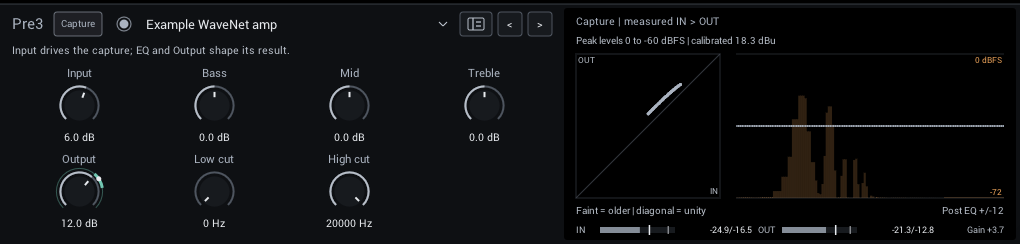
Load a .nam capture of an amp, pedal, or full rig. Bass, Mid, and Treble are NAM Grid's post-capture EQ, not the captured amp's original controls. Compatible A2 captures offer Quality: A2 / A2 Lite in the header; A2 Lite uses less CPU.
| Control | Range | Start | What it does |
|---|---|---|---|
| Input | -40 to +40 dB | 0 dB | Drives the capture. |
| Bass | -12 to +12 dB | 0 dB | 150 Hz shelf after the capture. |
| Mid | -12 to +12 dB | 0 dB | Broad 800 Hz bell after the capture. |
| Treble | -12 to +12 dB | 0 dB | 3 kHz shelf after the capture. |
| Output | -40 to +40 dB | 0 dB | Level after the capture and its EQ. |
| Low cut | 0–300 Hz | 0 Hz | Removes low end after the capture; 0 is off. |
| High cut | 2000–20000 Hz | 20000 Hz | Removes highs after the capture; 20000 is open. |
Display: Left: the capture's measured input against output. Right: the post-capture EQ over the live output spectrum.
Tips:
- Set Input so the capture is driven as intended; its calibration in dBu shows in the display.
Cabinet IR
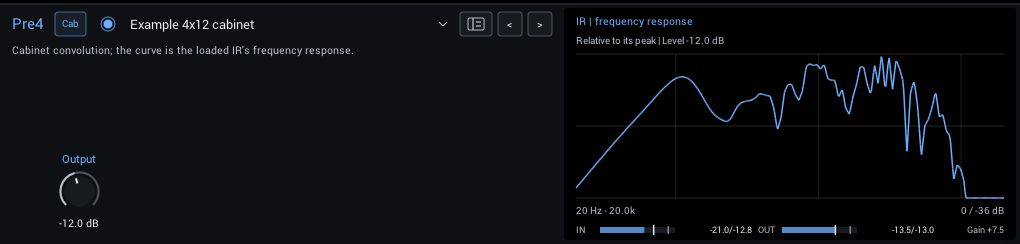
Load a mono cabinet impulse response (.wav). IR levels vary, so match the output volume when comparing cabinets. See Cabinet IR processing for how IRs are played.
| Control | Range | Start | What it does |
|---|---|---|---|
| Output | -36 to +18 dB | -18 dB | Level of the cabinet. IR levels vary; -18 dB is the usual cabinet headroom. |
Display: The loaded IR's frequency response, relative to its peak.
Tips:
- Start at -18 dB Output and match the level with the strip below the editor.