
Cosmic Echo
Six ambient echo and reverb styles, from rhythmic repeats to vast washes. Find Cosmic Echo in the Reverb category.
The module is directly inspired by the algorithms of Valhalla Supermassive, a free plugin by Valhalla DSP that is well worth trying on its own. It is adapted from David Braun's independent, MIT-licensed Faust reconstruction. These are six modes of that model, not every mode of the commercial plugin, and they do not claim to sound identical.
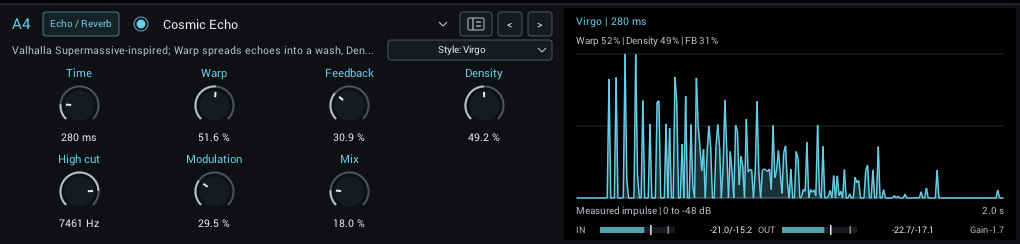
Styles
| Style | Character |
|---|---|
| Gemini | Quick, dense and smooth ambience |
| Sagittarius | Slow, swelling build-up |
| Virgo | Sparse echoes that get darker with every repeat (the starting style) |
| Centaurus | Swelling, enveloping ambience |
| Great Annihilator | Delays and diffusion in one large feedback loop |
| Lyra | Clearer, sparse echoes |
Changing the style fades out the old tail before the new style comes in.
Shape the sound
The controls are listed in the module guide. Two of them work as a pair: Warp spreads evenly spaced echoes into uneven, reverb-like spacing, and Density then fills that space in. At Warp 0, Density changes little.
In Sagittarius and Centaurus, Feedback changes how the sound builds up, not only how long it lasts, and Sagittarius can take several Time intervals to swell.
Some things are fixed: the modulation runs at 0.3 Hz, the effect is always fully stereo with an 80 Hz low cut, and there is no tempo sync. Automating Time or Warp bends the pitch of the sounding tail.
Tips
- Start with low Warp for rhythmic echoes, then raise Warp and Density for an ambient wash.
- Gemini is dense straight away; lower Warp and Density to hear its echo structure.
- For Sagittarius, try lower Feedback: it changes the swell, not just the length.
- Compare at matched loudness against Cloud, Diffused Delay and Galactic Space, with short attacks, held chords and high-gain guitar.
The display
The display shows the measured response of the current settings to a single click, on a dB scale. Separate spikes are distinct echoes; Warp spreads them into a wash, and Density then fills it in. It is measured again whenever a setting changes, so it shows what you will hear rather than an estimate.