
Pedal Drive
Pedal Drive is in the Distortion module category. It provides voiced overdrive, distortion, fuzz and colored boost for electric guitar and bass. Choose Style in its header; the module guide lists the controls.
The existing Distortion, Tube Boost and Boost modules retain their previous sounds. Pedal Drive has separate controls and saved style identities.
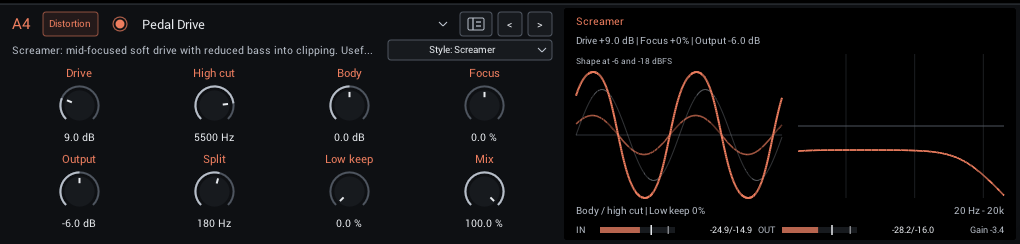
The enable/bypass circle is in the module editor header, matching the grid node. All eight dial positions are available for sound controls.
Choose a voice
| Style | Character | Useful starting application |
|---|---|---|
| Screamer | Mid-focused soft clipping, less bass entering saturation, rounded top end | Mild overdrive into a clean amp, or focused boost into a driven capture |
| Rodent | Frequency-shaped gain, slew rounding and harder clipping | Crunchy rhythm and heavier distortion; bass grind with clean lows |
| Bass Edge | Asymmetric two-stage saturation and upper-mid emphasis | Defined bass drive with Low keep raised |
| Parallel OD | Drive increases gain and shifts an internal clean/clipped balance toward clipping | Articulate low-gain boost and overdrive |
| Sustain Fuzz | Cascaded clipping, interstage filtering and scooped mids | Dense guitar leads, heavy bass fuzz and sustained chords |
| Cascaded Preamp | Two mildly asymmetric stages with filtering between them | Gentle breakup and a warmer bass upper band |
| Treble Drive | Bass-light colored boost with asymmetric grit | Push a crunchy amp capture for classic rock sounds |
| Blues OD | Bluesbreaker-inspired, bandwidth-limited gain into soft clipping with a clean contribution | Light breakup, chord definition and stacking into another drive |
| Transparent OD | Restrained voicing with bass shaping before clipping and treble filtering afterward | Timmy-inspired boost and overdrive that preserves more of the surrounding rig's character |
| Vintage Fuzz | Two inverting stages with coupling and bias-dependent decay | Fuzz Face-inspired leads, rounder fuzz or pinched, gated textures |
These are original voices informed by pedal families, rather than measured or calibrated replicas. Product and company names identify design references and belong to their respective owners. NAM Grid is independent and is not affiliated with or endorsed by those manufacturers. Style selection changes a combination of filters and gain stages. High cut is always an output low-pass frequency in Hz; it does not become a reversed pedal tone knob.
Match loudness with Output when comparing styles. Drive is gain into the stages, so its audible effect depends on the instrument's level and the chosen voice. Start lower with a hot active bass or an already loud signal.
Character: start in the center
The top-right dial is a Character control whose label changes with Style. It runs from -100% to +100%, starts at 0%, and double-clicking returns it to the center. The seven original voices retain their original sound at the center.
| Style | Dial label | Negative | Center | Positive |
|---|---|---|---|---|
| Screamer | Focus | More bass enters clipping | Original mid-focused voice | Tighter bass, stronger mid emphasis |
| Rodent | Bite | Rounder gain emphasis and slower attack | Original bite and slew | More upper-mid drive and faster slew |
| Bass Edge | Attack | Softer upper-mid emphasis | Original attack | Stronger upper-mid attack |
| Parallel OD | Blend | More internal clean sound | Original Drive-linked blend | More internal clipped sound |
| Sustain Fuzz | Mids | Deeper scoop | Original scoop | Fuller mids |
| Cascaded Preamp | Asymmetry | More symmetric stages | Original stage biases | More asymmetric stages |
| Treble Drive | Focus | Fuller input to the drive | Original treble voicing | Greater bass reduction |
| Blues OD | Clipping | More open soft clipping | Base soft clipping | Additional harder output clipping |
| Transparent OD | Clipping | More compressed symmetric clipping | Open symmetric clipping | Asymmetric clipping |
| Vintage Fuzz | Bias | Rounder, more symmetric fuzz | Base vintage fuzz | Pinched waveform and gated quiet decays |
Focus on Screamer explores the direction of bass/fat modifications. Unlike Low keep, it changes how much bass participates in distortion. Body remains a broad shelf before the voice; Focus adjusts the voice's own bass reduction.
Character affects the driven path; preserved clean lows bypass it. The same Character value remains stored when you change styles, so return to center when comparing their base sounds. Your DAW and the modulation matrix always call this parameter Pedal Character, even when the visible dial says Focus, Bias or another style-specific name.
Vintage Fuzz models the character of coupled gain stages and adjustable bias; it does not simulate analog pickup impedance or recreate a particular transistor pair. Lowering its input can clean up the sound, but hardware guitar-volume interaction is not guaranteed.
Preserve lows within one slot
For a simple single-lane bass rig, start here: Low keep preserves bass weight without using a second grid lane. Both Low keep and Split are dials in the module editor.
Low keep removes a share of the low-frequency signal before Body and the drive stages, then restores that share after High cut. Split sets this local low-band frequency. At Low keep zero, Split has no effect on the sound.
              +-- Body -> drive stages -> High cut --+
Input -> split+                                     +-> Mix -> Output
              +-- clean low return -----------------+    ^
Input ---------------- aligned full-range dry ----------+
At Low keep 100%, the entire extracted low band follows the clean return. The split is gentle: some low-frequency content remains in the driven branch, and distortion can create new components there. This is not a brick-wall separation or a guarantee of an unchanged final bass spectrum.
Start a bass rig with Bass Edge, Split around 180 Hz and Low keep at 100%. Adjust Split to move the balance between bass weight and driven definition. Lower Low keep to let more of the fundamental enter saturation. Body shapes only the drive path; use Output to set the level of the complete result.
Mix has a different job: it blends the complete pedal result, including its restored lows, with the original full-range input. It can restore dry attack and definition, but does not prevent bass from reaching the clipping stages. Parallel OD has an additional internal clean/clipped blend linked to Drive; that blend and the outer Mix are independent.
This local return does not use either grid lane. You can place Pedal Drive in Pre, A, B or Post, and use both parallel lanes for other processing.
Using the grid split
The grid's Routing > Frequency split works earlier in the signal chain, after Pre4. It sends low-pass audio to lane A and the complementary remainder to lane B. It is a first-order split with broad overlap. Centered A/B, equal lane levels and unprocessed lanes reconstruct the original signal.
                     +-- A: clean lows -------------------+
IN -> Pre -> split --+                                    +-> Post -> OUT
                     +-- B: Pedal Drive, Low keep 0% ------+
Use the grid split when you want to edit, compress, EQ, mute or level the two branches separately. Start with Crossover around 180 Hz, A/B at 50%, lane levels at 0 dB and Lane timing at 0 ms. Put Pedal Drive in B1 with local Low keep at zero. The included Bass - Split Edge and Bass - Split Warm rigs demonstrate this arrangement.
Moving A/B away from the center changes the low/high balance; it is not a conventional full-range wet/dry control while the split is enabled. Keep it centered initially and use lane levels to set the balance.
Placement matters:
- A drive in Pre processes the full signal before the grid split. Splitting it later cannot recover clean bass that was already distorted.
- A drive in B processes the upper branch, while A can retain a clean low band.
- A drive in Post processes the recombined signal and can distort the restored lows. The same applies to a driven NAM capture in Post.
- Pedal Drive's local Low keep acts on the signal arriving at that slot. In B it would split the upper branch again; start with it off in a grid-split bass rig.
Neither split removes or reverses previous distortion. To keep the final bass lows clean, route them around downstream nonlinear processing too. A common amp or cabinet after the lanes can still be appropriate when its coloration is part of the intended sound.
The grid compensates the lanes' reported processing delays, including Pedal Drive's delay. Filter phase and nonlinear coloration can still change the combined tone. Check the result in mono and leave Lane timing at zero unless you deliberately want a timing offset.
Example rigs
Fresh installations include Drive Examples in the preset library. Existing users can choose Settings > Add drive presets..., select a folder and rescan if needed. The action adds the folder to the preset library and keeps existing files, including edited examples. Loading an example replaces the current rig.
The examples contain effects without external capture or IR dependencies:
- Drive - [style] starts each Pedal Drive voice in Pre1. Bass Edge includes local Low keep; the other voices start without it.
- Boost - Flat, Boost - Tight and Boost - Warm use clean Boost. Tight raises the low cut and brightens Tilt; Warm tilts toward the bass.
- Bass - Split Warm uses Cascaded Preamp in B1; Bass - Split Edge uses Bass Edge. Both retain the grid's low branch in A and disable local Low keep.
Add your amp/cabinet processing where needed. For guitar, try the drive before a NAM amp capture followed by a cabinet IR if the capture does not already include one. The examples are starting points; their output trims are not automatic loudness matching.
Choosing a voice or a NAM capture
Use Pedal Drive when you want to adjust the voicing, clipping character and clean-low balance within one slot. Use a pedal NAM capture when you want the response learned from a particular unit and settings. A capture may represent interactions beyond these simplified voices; it does not expose the original pedal's knobs as modeled controls.
An algorithmic voice is not automatically cheaper than a neural capture. Pedal Drive runs at four times the host rate, while a NAM capture runs at its trained rate with sample-rate conversion when needed. A2 Lite can be economical; compare the actual capture and rig using the FX benchmark tools. CPU measurements do not establish which sounds closer to hardware; compare at matched input and output levels and include quiet notes and decays.
Processing and latency
Pedal Drive runs its nonlinear path at four times the host sample rate, with FIR filtering on interpolation and decimation. This reduces aliasing while adding 64 host samples of latency: approximately 1.45 ms at 44.1 kHz or 1.33 ms at 48 kHz. The plugin reports the delay to the host and aligns dry Mix, bypass, the clean low return and parallel grid lanes. The delay stays constant across styles and while bypassed.
Style changes crossfade over 20 ms. Left and right channels have independent histories. Control changes are smoothed, and processing does not allocate memory in the audio callback. The display responds as you turn the controls. On the left, the selected style shapes a 220 Hz test tone at loud and quiet input levels, showing how Drive and Character change its clipping and cleanup. This illustrates the drive stage; it is not a scope of your input. On the right, a small-signal curve shows Body, High cut and the clean Low keep band, including Mix and Output. The complete sound also depends on the style's nonlinear, stateful processing. The footer meters show the module's actual input, output and gain.
Design references
No pedal-model source code was copied. The original implementation uses the following published designs and descriptions as references:
- Aion Stratus schematic and notes: mid-focused feedback clipping and low-frequency gain shaping.
- Aion Helios schematic and notes: frequency-shaped gain followed by diode-to-ground clipping.
- Aion Refractor documentation: coupled gain and internal clean/clipped blending.
- Aion Halo documentation: cascaded clipping and midrange shaping.
- Aion Cerulean schematic and notes: Bluesbreaker-family gain structure and soft/hard clipping options.
- MXR Timmy manual: pre-drive bass shaping, post-drive treble filtering and clipping/headroom choices.
- Aion Solaris schematic and notes: Fuzz Face-family coupled stages, input/body controls and adjustable bias.
- Darkglass B3K and X Ultra manuals: clean-signal blending and separate low/high processing.
- Keeley Katana and BOSS BD-2: staged preamp/drive concepts.
- Analog Man Beano Boost: a colored, frequency-selective booster.
For the aliasing problem and approaches beyond oversampling, see Parker, Zavalishin and Le Bivic, DAFx 2016.