
Noise Gate (Smart)
A noise gate that learns your rig's noise. Play nothing, switch on Learn, and it reduces that noise frequency by frequency while you play, instead of only opening and closing. Quiet picking and decaying chords stay more natural than with an ordinary gate.
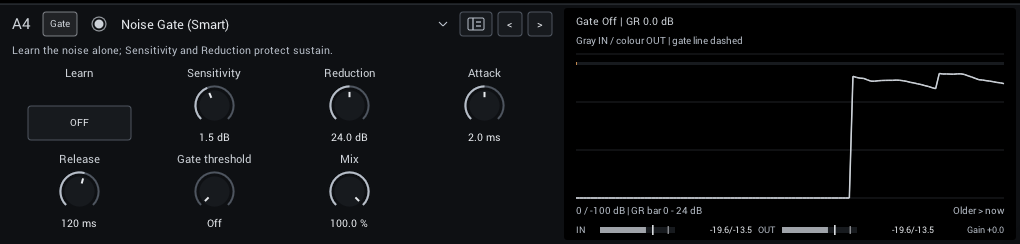
Set it up
- Add Dynamics > Noise Gate (Smart) in a Pre slot, before drives and captures.
- Keep your guitar and interface at normal playing settings. Mute the strings with your hand, without turning the guitar's volume down.
- Switch Learn on for one to three seconds, then off. Audio keeps playing while it learns.
- Play with the starting settings first, and compare against bypass on low notes, quiet picking and decaying chords.
Learning ignores digital silence and captures shorter than about 300 ms; the previous noise profile stays in place.
Fine-tune
Change one control at a time; the control table lists them all.
- Raise Sensitivity until the remaining noise is gone, and back off if sustain loses detail.
- Lower Reduction if pauses sound unnaturally dead; a little room tone often sounds better than silence.
- Only if you want completely silent pauses, raise Gate threshold from Off to just above the noise floor. It shares the Release knob and has a short hold, so it does not chatter.
The GR readout estimates the current reduction. It is a guide, not a measurement of how much quieter the noise sounds.
When to learn again
Learn again after changing pickups, guitar volume or input gain, moving to a different room or interface, or changing the sample rate.
The learned profile is saved with your project and rig preset and travels with Copy, Move and Swap. Learn itself is never saved switched on, and scenes do not change the profile.
Good to know
- Keep it before delays and reverbs, so their tails are not reduced.
- Noise that overlaps a note cannot be removed completely, and strong settings can slightly change the tone.
- It adds no latency.
- When only the silence between notes matters, the standard Noise Gate does the job with less CPU.