
Grid & routing
NAM Grid gives you 16 slots in four rows: Pre, the parallel lanes A and B, and Post. Sound flows left to right through each row; empty slots simply pass it on.
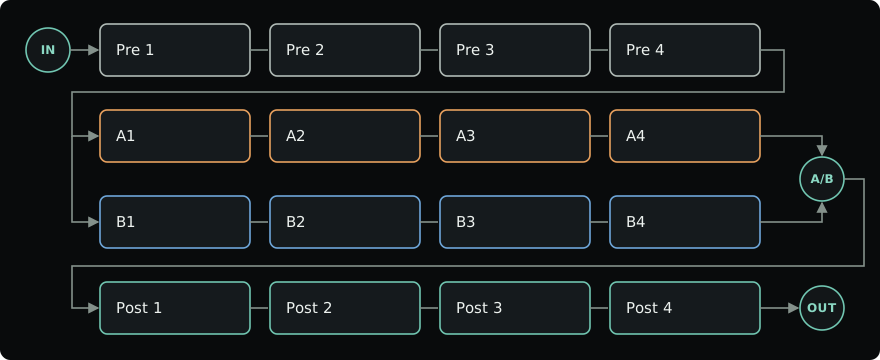
- Pre and Post process everything, before the split and after the blend.
- Lanes A and B both receive the same sound from Pre 4. A/B blends their results.
- IN sets the level reaching the rig, the tuner and the envelope follower. OUT sets the final level sent to your DAW.
Any slot can hold a NAM capture, a cabinet IR or a built-in effect. Click a slot's name or + Add module to choose one; see Editor for moving, copying and bypassing modules.
Typical placement
There are no fixed rules, but this order is a good start:
| Where | What | Why |
|---|---|---|
| Before the amp | Gate, compressor, boost, drive, wah, octaver | They react to your playing and shape what the amp receives. |
| Amp | NAM capture | A drive in front pushes it harder, like a pedal into an amp. |
| After an amp-only capture | Cabinet IR | Full rig captures already include a cabinet. |
| After the cabinet | EQ, modulation, delay, reverb | Stereo effects keep their width after the mono capture. |
| Last in Post | Peak Limiter or Console Colour | Catch peaks or add glue to the whole rig. |
NAM captures are mono: they combine both channels into one. Place stereo effects after the last capture to keep them wide.
Set a healthy level as you go. Use IN for the level into the rig, each module's Output for its own gain, and OUT for the final level. Match the volume with the module bypassed before judging a tone; the level meters help.
Parallel lanes and blend
A/B sets the balance between the lanes: 0% is A alone, 50% is both equally, and 100% is B alone. The blend moves smoothly and can be automated.
- Try different amps or cabinets in each lane, or keep one lane dry and put effects in the other.
- An empty lane still passes the sound from Pre. Turn A/B fully toward a lane to hear only that lane.
- Parallel captures can reinforce or cancel frequencies. If the combination sounds thin, adjust the lane levels or Lane timing and compare in mono.
- Captures use CPU even when A/B favours the other lane. Bypass unused ones to save CPU.
Routing
Click Routing below the A/B knob for the lane controls. Select a module, close the page, or press Escape to return.
- Lane A / Lane B: set each lane's level, or mute or solo it. Solo respects the current blend; if both lanes are soloed, both play. Mute wins over solo.
- Lane timing: delay one lane by up to 20 ms to explore timing and phase between captures. Positive values delay A; negative values delay B.
- Frequency split: send the lows to A and the highs to B, divided at Crossover. With both lanes empty and A/B centered, the original sound is reconstructed. This is a gentle split, not a steep multiband crossover.
Use the split for rigs such as a clean low end in A and a driven high band in B. Check the combined tone in mono as well as stereo.
Lane levels, the crossover and A/B can all be modulated.
Missing captures and IRs
If a capture or IR file moves, its slot keeps the reference and passes the sound through until you relink it. NAM Grid never silently substitutes a different file. After a rescan, a file that was moved or renamed inside your library folders is recognized by its content and relinked automatically; see missing captures.