
Cosmic Echo
Ten selectable ambient echo and reverb styles, from rhythmic repeats to vast washes. Find Cosmic Echo in the Reverb category.
The first six styles are directly inspired by the algorithms of Valhalla Supermassive, a free plugin by Valhalla DSP that is well worth trying on its own. It is adapted from David Braun's independent, MIT-licensed Faust reconstruction. Those styles are six modes of that model, not every mode of the commercial plugin, and they do not claim to sound identical. Aurora Hall, Pulsar Echo, Binary Bloom and Photon Plate are original NAM Grid designs with different diffusion and feedback arrangements.
Styles
| Style | Character |
|---|---|
| Gemini | Quick, dense and smooth ambience |
| Sagittarius | Slow, swelling build-up |
| Virgo | Sparse echoes that get darker with every repeat |
| Centaurus | Swelling, enveloping ambience |
| Great Annihilator | Delays and diffusion in one large feedback loop |
| Lyra | Clearer, sparse echoes |
| Aurora Hall (starting style) | Clustered echoes at low Density, a guitar hall at high Density, and long washes with more Feedback |
| Pulsar Echo | Four-tap stereo echo groups that rotate and diffuse as Density rises |
| Binary Bloom | Coupled short and long spaces for broader, slowly developing ambient tails |
| Photon Plate | Faster onset and denser early reflections from a multi-tap, cross-coupled digital plate tank |
Changing the style fades out the old tail before the new style comes in.
Shape the sound
The controls are listed in the module guide. Two of them work as a pair: Warp spreads evenly spaced echoes into uneven, reverb-like spacing, and Density then fills that space in. In the first six styles, Density changes little at Warp 0. Aurora Hall retains unequal spacing and adds diffusion inside its loops, so Density still changes the texture at Warp 0.
In Sagittarius and Centaurus, Feedback changes how the sound builds up, not only how long it lasts, and Sagittarius can take several Time intervals to swell.
Some things are fixed: the modulation runs at 0.3 Hz, the effect is always fully stereo with an 80 Hz low cut, and there is no tempo sync. Automating Time or Warp bends the pitch of the sounding tail.
Tips
- Start with low Warp for rhythmic echoes, then raise Warp and Density for an ambient wash.
- Gemini is dense straight away; lower Warp and Density to hear its echo structure.
- For Sagittarius, try lower Feedback: it changes the swell, not just the length.
- Compare at matched loudness against Cloud, Diffused Delay and Galactic Space, with short attacks, held chords and high-gain guitar.
Aurora Hall: echoes and washes
Aurora Hall uses eight main loops, each with a short diffuser, running at the host sample rate. High cut and the fixed 80 Hz low cut sit inside each loop, so repeats lose treble and low-end buildup. There is no undersampling or saturation. The Time and Warp controls move read positions, so automating them can still bend pitch.
Try these starting points, then adjust Mix against your dry guitar:
| Sound | Time | Warp | Feedback | Density | High cut | Modulation | Mix |
|---|---|---|---|---|---|---|---|
| Guitar hall (insertion/reset default) | 225 ms | 65% | 65% | 85% | 7500 Hz | 30% | 20% |
| Clustered echoes | 350 ms | 15% | 65% | 10% | 6500 Hz | 5% | 20% |
| Long ambient wash | 500 ms | 80% | 94% | 100% | 4500 Hz | 30% | 30% |
Aurora Hall and the guitar-hall row are the insertion/reset defaults for Cosmic Echo. Existing saved rigs keep their stored style and settings. The other rows are optional recipes. Low Density leaves separate repeats; raise it for more scattering and reflections within each loop. Use Time around 100–250 ms for a hall, or longer times to hear the network as echoes. Feedback sets regeneration rather than a calibrated decay time; high settings can ring beyond the host's reported 60-second tail.
Complementary styles
These three styles use the existing controls and do not change the Aurora Hall insertion/reset default. The descriptions are listening goals, rather than claims to reproduce a physical plate or room.
| Style | Intended use and behavior | Starting point |
|---|---|---|
| Pulsar Echo | Rhythmic four-tap echo groups for single-note riffs and stereo movement. The end of the pattern feeds the opposite channel. Low Density keeps the four taps clear; higher values rotate stereo and diffuse each stage. Warp compresses the later gaps. Time scales the pattern; short diffusers add to its length, so this is not a tempo-synced delay. | Time 500 ms, Warp 0%, Feedback 65%, Density 15%, High cut 6500 Hz, Modulation 5%, Mix 25% |
| Binary Bloom | Sustained chords and volume swells that need an initial small space followed by a broader tail. Short and long eight-line tanks exchange energy as Density rises. At Density zero, only the short tank is excited; raise Density to bring in the longer field. Warp spreads the long lines. | Time 700 ms, Warp 75%, Feedback 90%, Density 90%, High cut 5000 Hz, Modulation 25%, Mix 30% |
Photon Plate is a separate, faster plate design: four stereo input-diffusion stages feed a cross-coupled figure-eight tank, with two allpasses and two main delays in each half. Seven taps per channel fill the early response. Start with Time 100 ms, Warp 70%, Feedback 65%, Density 90%, High cut 9000 Hz, Modulation 10%, Mix 18%. Density always leaves some diffusion; its minimum is not intended as a plain delay. Warp changes tank asymmetry. Low cut acts on the excitation once, while High cut damps the tank.
For a clearer Pulsar pattern, try Time 600 ms, Warp 0%, Feedback 45%, Density 0%, High cut 8000 Hz, Modulation 0%, Mix 25%. For a less literal scattering echo, raise Density into the 20–50% range and then Warp. Selecting a style retains the current knobs, so inherited Aurora Hall settings can make Pulsar much more diffuse than its starting recipe.
All three process at the host sample rate with damping inside the feedback paths. Start with Modulation low when comparing their underlying echo patterns. Raise Time and Feedback gradually for long tails. Like the other modes, changing Style fades and clears the sounding tail.
The display
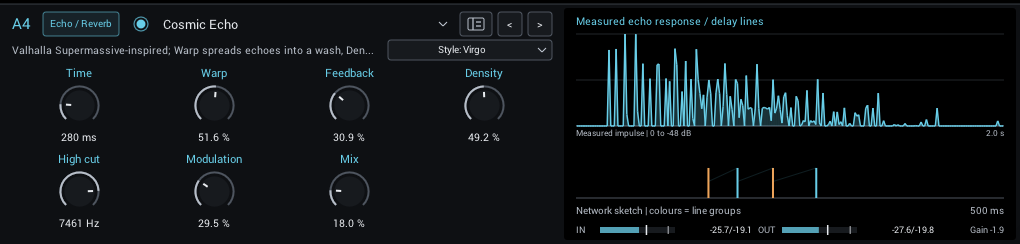
The display shows the measured response of the current settings to a single click, on a dB scale. Separate spikes are distinct echoes; Warp spreads them into a wash, and Density then fills it in. It is measured again whenever a setting changes, so it shows what you will hear rather than an estimate.
Below it, the network sketch shows the base timing of the style's 4 or 16 delay lines, with the count available on hover. Warp changes their spacing, Density connects the lines, and the faint halos show modulation depth. At Warp 0, several lines can share the same position. Colours distinguish network groups; these are not direct left/right output taps. Each graph has its own labelled time span: the upper graph includes repeats and diffusion, while the lower sketch focuses on the line lengths. Hover each graph for its own explanation: the upper graph describes the measured response, and the lower sketch gives the current line count and network legend.
For Aurora Hall, the network sketch separates the eight main delays (blue) from the eight short diffusers (orange). A loop includes both delays; a marker is not the arrival time of a complete reflection. Modulation depth is limited relative to each line length to keep the short diffusers from sweeping through zero.
Pulsar Echo shows four stereo stages in blue and their diffusers in orange; a complete pattern traverses all stages. Binary Bloom uses blue for the long tank and orange for the short tank. Markers show individual line lengths, not complete reflection arrivals.
For Photon Plate, blue marks eight input-diffuser lines and orange marks the two four-line tank halves. Output taps observe shorter positions within the tank, so the longest line does not determine the first reflection.